👩🏻💻 Point of Today I LEARNED
📌 SQL
● 코드카타 (71~75번 복습)
📌 Python
● 챌린지반 강의 4회차 (통계검증)
● 챌린지반 강의 5회차 (머신러닝 사고법)
● 통계학 라이브세션 5회차 복습 (회귀 실습)
우연히 (?) 챌린지반 수업을 들어봤다.
들어보니 프로젝트할 때 도움이 많이 될만한
사고중심 강의이고,
통계학과 머신러닝 개념이 어느 정도 잡힌 상태라
이제는 실습을 통해서 사이사이를 메꿔가야 하는 타이밍이라고 생각하기 때문에
나머지 회차도 독학해볼 예정이다.

1. SQL
1-1. 코드카타 제한시간 두고 풀기
1) 코드카타 70번
방법1. where ~ in + window 함수
select
    m.MEMBER_NAME,
    r.REVIEW_TEXT,
    date_format(r.REVIEW_DATE,'%Y-%m-%d')
from MEMBER_PROFILE m
join REST_REVIEW r
on m.member_id = r.member_id
where m.member_id in (
                    select member_id
                    from
                        (select
                            member_id,
                            rank() over(order by count(1) desc) rnk
                        from rest_review
                        group by member_id) a
                    where rnk = 1
                    )
order by 3,2- 처음에 rank() over(partition by member_id order by count(1) desc) 로 했다가 틀렸다.
- window 함수 over(order by ) 절에 집계함수를 쓸 때는 반드시 바깥에서 group by 해줘야 한다.
- 이유 : 집계함수 묶어줄 기준 필요하니까.
- partition by 는 집계에 필요한 그룹핑을 해주는 기능이 아님.
방법2. join + window 함수
select
    m.MEMBER_NAME,
    r.REVIEW_TEXT,
    date_format(r.REVIEW_DATE,'%Y-%m-%d')
from MEMBER_PROFILE m
join REST_REVIEW r
on m.member_id = r.member_id
join
    (select member_id
    from
        (select
            member_id,
            rank() over(order by count(1) desc) rnk
        from rest_review
        group by member_id) a
    where rnk = 1
    ) b
on m.member_id = b.member_id
order by 3,2
방법3. with 구문 활용
with review1 as (
    select member_id
    from
        (select
            member_id,
            rank() over(order by count(1) desc) rnk
        from REST_REVIEW
        group by member_id) a
    where rnk = 1
)

select
    m.MEMBER_NAME,
    rr.REVIEW_TEXT,
    date_format(rr.REVIEW_DATE, '%Y-%m-%d')
from review1 r1
join MEMBER_PROFILE m
on r1.member_id = m.member_id
join REST_REVIEW rr
on r1.member_id = rr.member_id
order by 3,2
2) 코드카타 71번
문제 포인트. union all할 때 모자란 컬럼 null 처리하기
with onoffline as (
    select *
    from online_sale
    union all
    select
        OFFLINE_SALE_ID,
        null as USER_ID, -- 'null' 쓰면 null이 출력됨 (⟵ 문자이므로 null값이 아님)
        PRODUCT_ID,
        SALES_AMOUNT,
        SALES_DATE
    from offline_sale
)

select
    date_format(sales_date, '%Y-%m-%d') SALES_DATE,
    product_id,
    user_id,
    sales_amount
from onoffline
where date_format(sales_date, '%Y%m') = '202203'
order by 1,2,3
3) 코드카타 73번
문제 포인트. with recursive 재귀문
with recursive hours as (
    select 0 as hour
    union all
    select hour + 1 as hour
    from hours
    where hour < 23)

select
    h.hour,
    count(o.ANIMAL_ID)
from hours h
left join animal_outs o on h.hour = hour(o.datetime)
group by 1
order by 1
4) 코드카타 74번
문제 포인트. 조건 한 번에 걸고 having + 특정 기간 대여 가능여부 조건 거는법 ⭐️
with filterd as (
    select distinct c.car_id, c.car_type, c.daily_fee, d.duration_type, d.discount_rate
    from CAR_RENTAL_COMPANY_CAR c
    left join CAR_RENTAL_COMPANY_DISCOUNT_PLAN d
    on c.car_type = d.car_type
    where
        c.car_type in ('세단','SUV')
        and d.duration_type = '30일 이상'
        and c.car_id not in (
                            select car_id
                            from CAR_RENTAL_COMPANY_RENTAL_HISTORY
                            where
                                date_format(start_date,'%Y%m%d') <= '20221130'
                            and date_format(end_date,'%Y%m%d') >= '20221101')
)

select
    car_id,
    car_type,
    floor(daily_fee * 30 * (1-discount_rate/100)) as FEE
from filterd
having FEE >= 500000 and FEE < 2000000
order by 3 desc, 2, 1 desc- select 절에서 계산된 값을 조건 기준으로 잡고 싶으면 having을 써야한다.
- 여전히 특정 기간에 대여가능한 조건 거는 게 어렵다.. 이해는 했으나 내일 다시 또 풀어보자.
5) 코드카타 75번
방법1. duration_type 컬럼 생성
select
    history_id,
    floor(case when plan_id is null then (daily_fee * duration)
    else (daily_fee * duration) * (1-discount_rate/100)
    end) as FEE
from
    (select
        h.history_id,
        c.car_type,
        c.daily_fee,
        datediff(h.end_date, h.start_date) + 1 as duration,
        case when datediff(h.end_date, h.start_date) + 1 >= 90 then '90일 이상'
            when datediff(h.end_date, h.start_date) + 1 >= 30 then '30일 이상'
            when datediff(h.end_date, h.start_date) + 1 >= 7 then '7일 이상'
        else '기타'
        end as duration_type
    from CAR_RENTAL_COMPANY_CAR c
    join CAR_RENTAL_COMPANY_RENTAL_HISTORY h
    on c.CAR_ID = h.CAR_ID) a
left join CAR_RENTAL_COMPANY_DISCOUNT_PLAN p
on a.car_type = p.car_type and a.duration_type = p.duration_type
where a.car_type = '트럭'
order by 2 desc, 1 desc
⬇︎
방법2. on절 조건으로 case when 사용하기 ⭐️
select
    h.history_id,
    floor(daily_fee * (datediff(end_date,start_date) + 1) * ifnull((1-discount_rate/100),1)) as FEE
from CAR_RENTAL_COMPANY_CAR c
join CAR_RENTAL_COMPANY_RENTAL_HISTORY h
on c.car_id = h.car_id
left join CAR_RENTAL_COMPANY_DISCOUNT_PLAN p
on c.car_type = p.car_type
and p.duration_type =
    case when datediff(h.end_date, h.start_date) + 1 >= 90 then '90일 이상'
         when datediff(h.end_date, h.start_date) + 1 >= 30 then '30일 이상'
         when datediff(h.end_date, h.start_date) + 1 >= 7 then '7일 이상'
    else '기타'
    end
where c.car_type = '트럭'
order by 2 desc, 1 desc- on 절에서도 case when 을 쓸 수 있다 !!!!
2. Python
2-1. 챌린지반 강의 4회차 (통계검증 ~ 상관관계 ~ 머신러닝)
1) 데이터의 정규성, 등분산성, 독립성, 데이터 타입에 따른 통계검증법 분류 (scipy.satats)
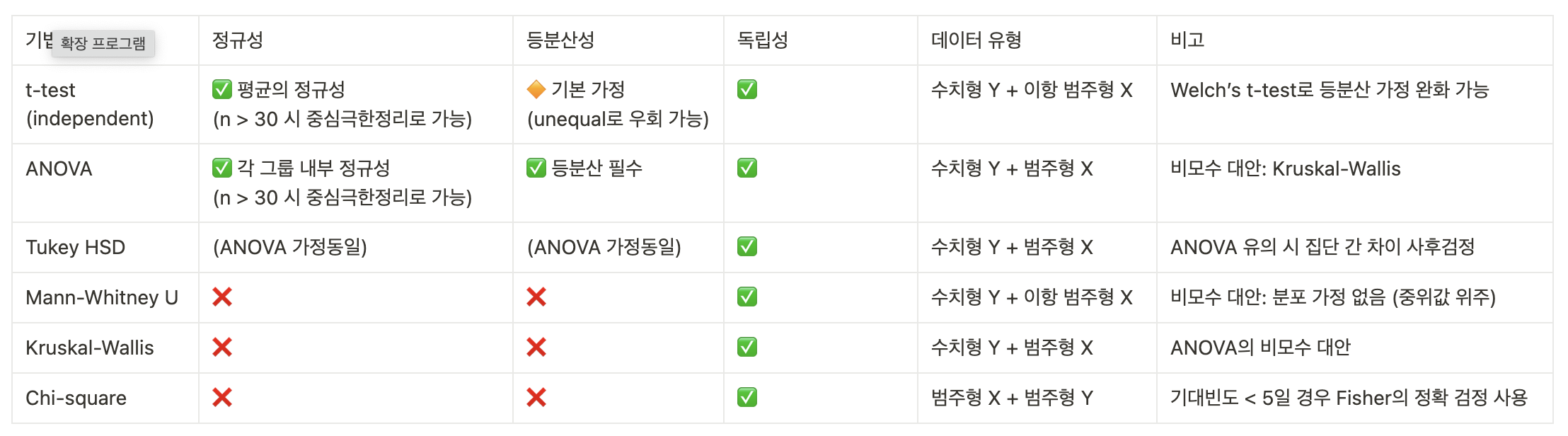
- 정규성
- 전체 데이터가 꼭 정규분포일 필요 없음
- 표본 크기(n) >= 30 이면 중심극한정리에 따라 어차피 정규분포됨
- 정규성 여부 확인은 Shapiro-Wilk ➜ p-value 0.05 미만이면 정규성 아님을 의미
- 등분산성
- t검정, ANOVA의 가정
- t검정은 uneqaul 써서 Welch's t-test 로 가정 완화 가능
- statistic, pvalue = ttest_ind(그룹 a, 그룹 b, eqaul_var=False)
- p-value 0.05 미만이면 등분산성 없다는 의미
- 독립성
- 샘플 간 독립성은 반드시 필요
- 동일한 유저의 반복/중복 측정하면 안 됨
2) 데이터 타입별 상관관계 확인 분류

- 변수 간 상관성을 수치화해서 크기 및 방향 파악
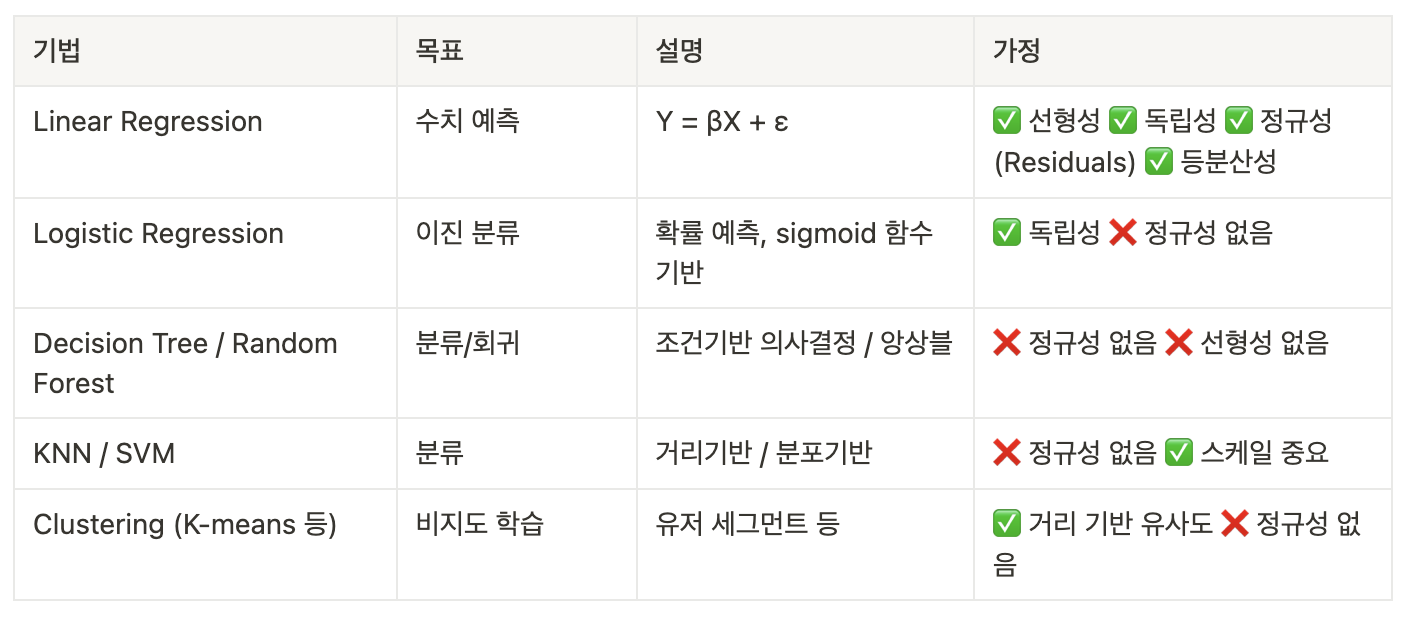
3) 머신러닝 모델 비교 (분류, 회귀, 군집 등)
2-2. 챌린지반 강의 5회차 (머신러닝 사고법)
1) 지도학습
① 예측할 결과값(Y값)이 데이터에 있는지 확인
⬇︎
② 없다면 새로 정의해서 new Y값 생성
⬇︎
③ 예측 시점 설정
: 시계열 정렬 중요 (누수 방지)
⬇︎
④ 예측에 쓸 데이터 선택
: feature engineering
⬇︎
⑤ 인사이트 기반 전략 연결
2) 비지도학습
① 정답(Y값)이 데이터에 있는지 확인
: 비지도 학습은 Label이 없으니 이 가정을 만족하는지를 확인
⬇︎
② 행동/속성 기반으로 그룹핑 가능 여부 확인
: 어떤 X값을 변수로 사용할 건지 선택
⬇︎
③ 군집 결과가 설명 가능한 것인가?
: 각 군집별 대표 특징 추출 가능한가?
⬇︎
④ 인사이트 기반 전략 연결
'데이터 분석' 카테고리의 다른 글
| [250414] 통계적검증과 머신러닝 비교, 릿지/라쏘 회귀, 분류모델 성능평가, 다중분류 전체실습 (0) | 2025.04.14 |
|---|---|
| [250411] ⭐️ 분석 흐름 정리 ⭐️, 트리기반모델 (1) | 2025.04.11 |
| [250409] 로지스틱회귀, 선형회귀모델의 성능평가, 파이프라인 (0) | 2025.04.09 |
| [250408] 머신러닝 - 데이터 전처리, 모델링(회귀) (0) | 2025.04.08 |
| [250407] 데이터타입별 검증법/상관계수, 회귀, 머신러닝 개요 (0) | 2025.04.07 |